How xAct.ai works
The product manager's guide to running an AI-driven product specification.
This guide covers the whole journey — what xAct.ai is and the principles behind it, the project lifecycle and its three phases, how the Inception dialogue works across the seven stakeholder roles, what xAct.ai replaces, how product feedback feeds the next release, step-by-step common tasks, answers to frequent questions, and a glossary of every term. Each section below is collapsible: search to jump to a topic, open just the one you need, or Expand all to read it straight through.
xAct.ai operationalizes the Inception phase of an AI-driven development lifecycle on AWS. It converts a business intent into an executable Product Requirements Document through a structured, multi-stakeholder dialogue conducted with specialist AI agents running on Amazon Bedrock. The PRD it produces is consumed directly by AI coding agents — Claude Code, Cursor, GitHub Copilot, and others — to generate working code.
What xAct.ai replaces is the unstructured PRD chase: the Slack threads asking who's driving, the Confluence pages no one updates, the JIRA tickets that re-litigate decisions sprint after sprint, the Loom recordings that go un-transcribed. In their place, a sequenced conversation with named handoffs, recorded rounds, and an artifact at the end that an AI coding agent can act on without further clarification.
Your first project, end to end, in three moves:
- Sign in. Use email + password, or one click with Google or GitHub. New here? Choose Create account. (Details in Account & sign-in below.)
- Create a project and describe it. From the Dashboard or Projects list, click Create project, name it, and pick a coverage level (S for a prototype → XL for regulated work). Open the Dialogue tab and tell xAct.ai what you're building in the opening panel — the more context, the better the dialogue.
- Answer the dialogue. Click Begin Dialogue and a specialist AI agent asks focused questions, a few per round. Answer them (or upload a document); the Coverage Auditor moves you through each topic. When you're satisfied, hand off to a teammate or approve to produce the PRD.
That's the whole loop. Everything below explains the pieces in depth — open only what you need, or use Expand all to read it straight through.
The dialogue is thorough by design, but you are not locked into the long path. Here are four ways to reach a solid PRD faster — from a full one-pass auto-draft to lighter-touch controls you toggle mid-dialogue. Combine them freely.
The fastest path. Paste a brief over roughly 1000 words into your opening statement and xAct offers Build it All: it drafts AND auto-approves the entire PRD for every stakeholder in one automated pass, then generates the architecture diagrams and emails you when it finishes. Best when your brief is already detailed and you want a complete first draft to react to rather than build up answer by answer. It is a deliberate opt-in from the modal — review the result before relying on it, and refine or reopen anything that needs a human pass.
Flip the Quick mode switch at the top of the Dialogue and each non-essential aspect closes after a single round, so the conversation moves quickly through the lighter topics instead of a full interrogation.
Build-critical aspects — the sections a downstream builder cannot complete without — are exempt: they stay fully covered no matter what, so a fast pass never drops something the PRD needs. Toggle it on or off any time; it applies to the rounds that follow, not the ones already recorded.
Every leg carries a Guided / Expert toggle on its header. Guided scaffolds you — plain language, proposed defaults, the essentials — which is what you want when a role is unfamiliar. Expert defers to you — terser, denser, sharper questions and room to go deeper — which moves faster when you already know the role cold.
It is set per leg, so you can be Guided as the PM and Expert as the Architect on the same project. A generalist at one role can be an expert at the next — the depth follows the work, not the person.
On the aspect navigator, Skip drops a non-essential aspect from this pass (build-critical ones cannot be skipped, and a skip is recorded honestly as skipped, never faked as covered), while Advance closes the current aspect and moves on the moment you have said enough — you never have to exhaust every question.
A common fast recipe: Build it All for a first draft you then refine, or Quick Mode plus Expert depth for a rapid but hands-on pass. Whichever route you take, clear any Open Questions & Conflicts on the PRD tab before you rely on the document.
The video every new account sees once on their first visit: your AI codes in seconds while your team argues for weeks — passing the baton is how xAct.ai closes that gap. Rewatch it anytime, or share this page with a teammate you're inviting — no sign-in needed.
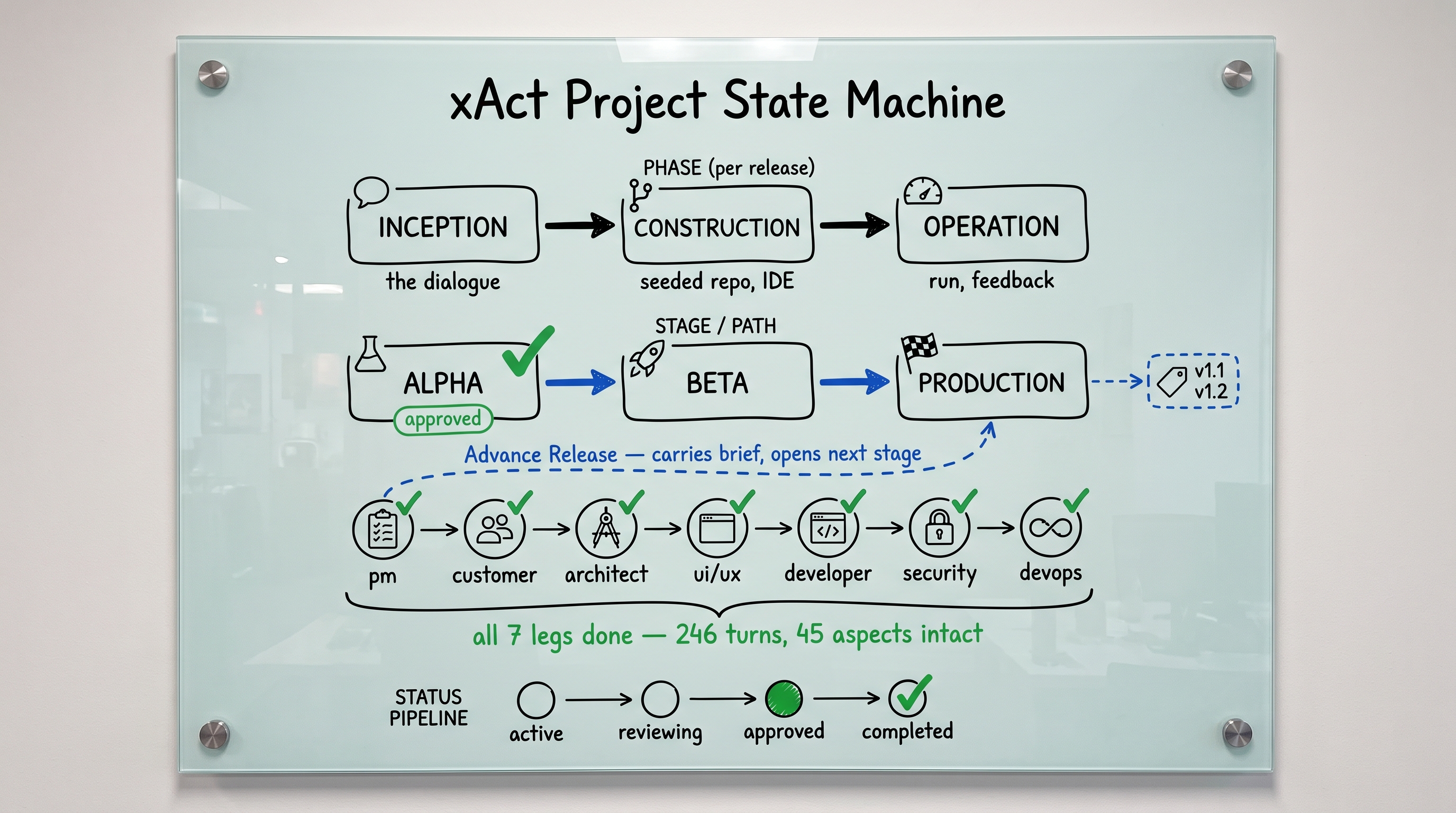
A picture of the whole model — the words you'll see in the app and use with your colleagues. Click any diagram to open it full-size.
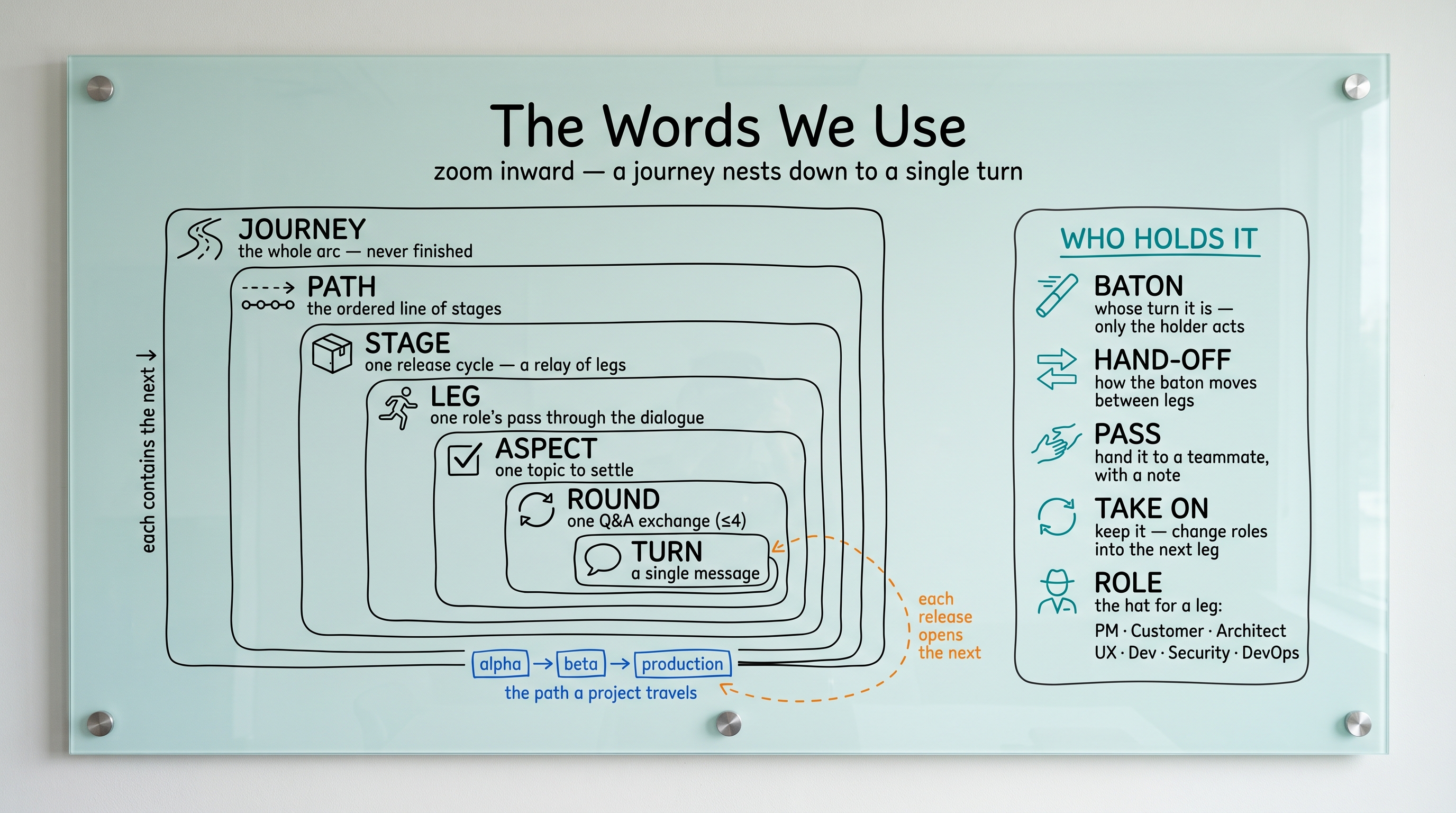
The diagram above, in words. Each term, what it means, and where you meet it in the app:
In the app: The project view is laid out as this journey; the active Stage and Leg are highlighted as you move along it.
In the app: Shown as the spine of the journey. Approving a release advances the Path and seeds the next Stage from the finished brief.
In the app: The current Stage (Alpha, Beta, or Production) sits at the top of the project; only the PM advances it.
In the app: Each Leg appears in the stage navigator; the active Leg belongs to whoever holds the baton.
In the app: You pick a role when you take the baton; it sets the AI agent's persona and the Aspects you will be asked about.
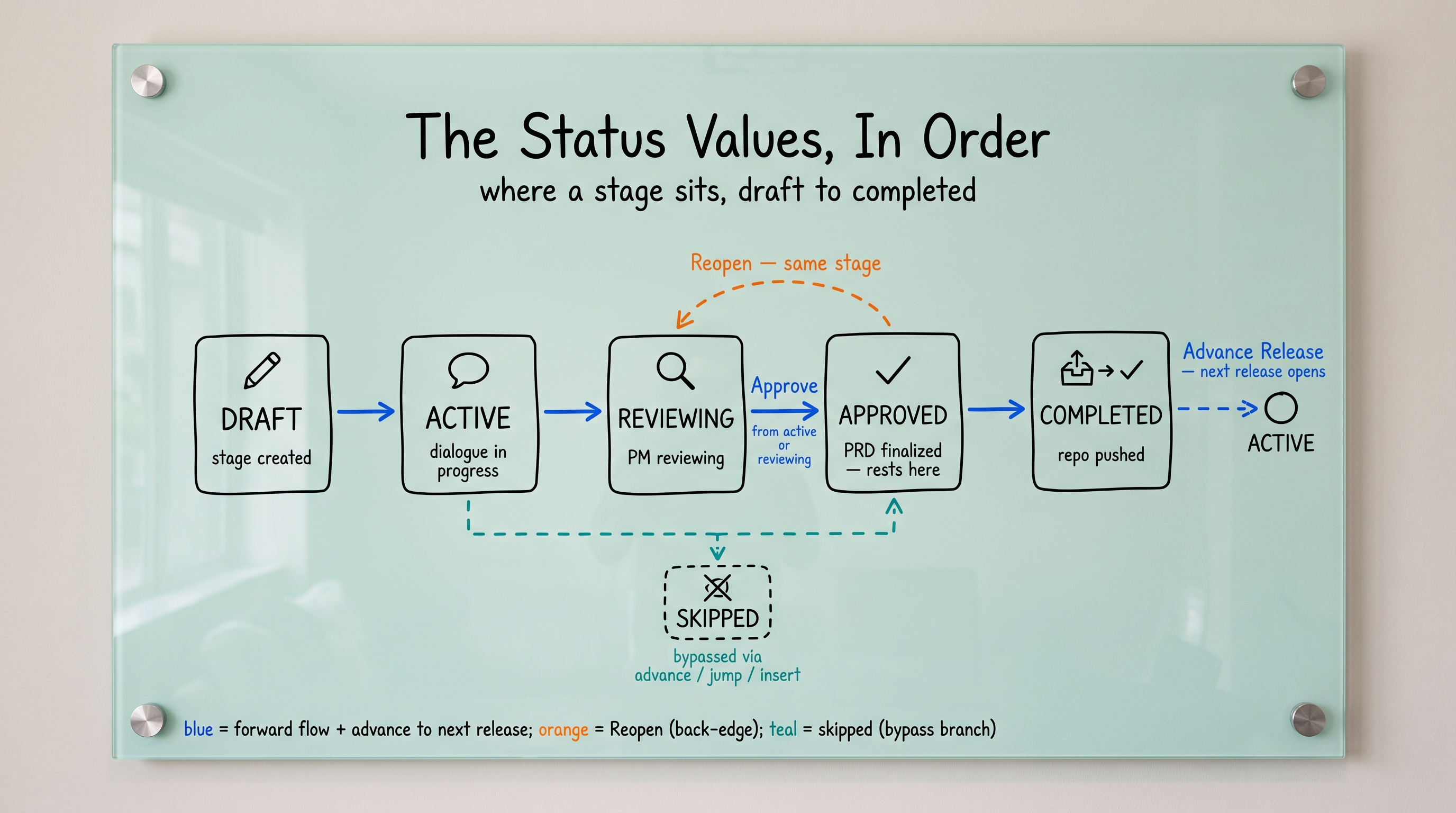
In the app: Listed in the Status panel as Completed, In progress, Pending, or Skipped. You can jump to, insert, or skip an Aspect.
In the app: Each batch of AI questions you answer is a Round; the Aspect advances as its Rounds resolve.
In the app: Every Turn is recorded with the author's name and a timestamp, and appears in the dialogue export.
In the app: The hand-off flow lets you choose the next role and add a short note that lands on their Draft PRD.
In the app: The Status panel shows whether you hold the baton or who does; it updates live, without a refresh.
In the app: Use Pass baton in the Collaboration tab: pick the receiver's role and write the hand-off note.
In the app: Choose Take on at a hand-off to switch your own role instead of inviting someone else.
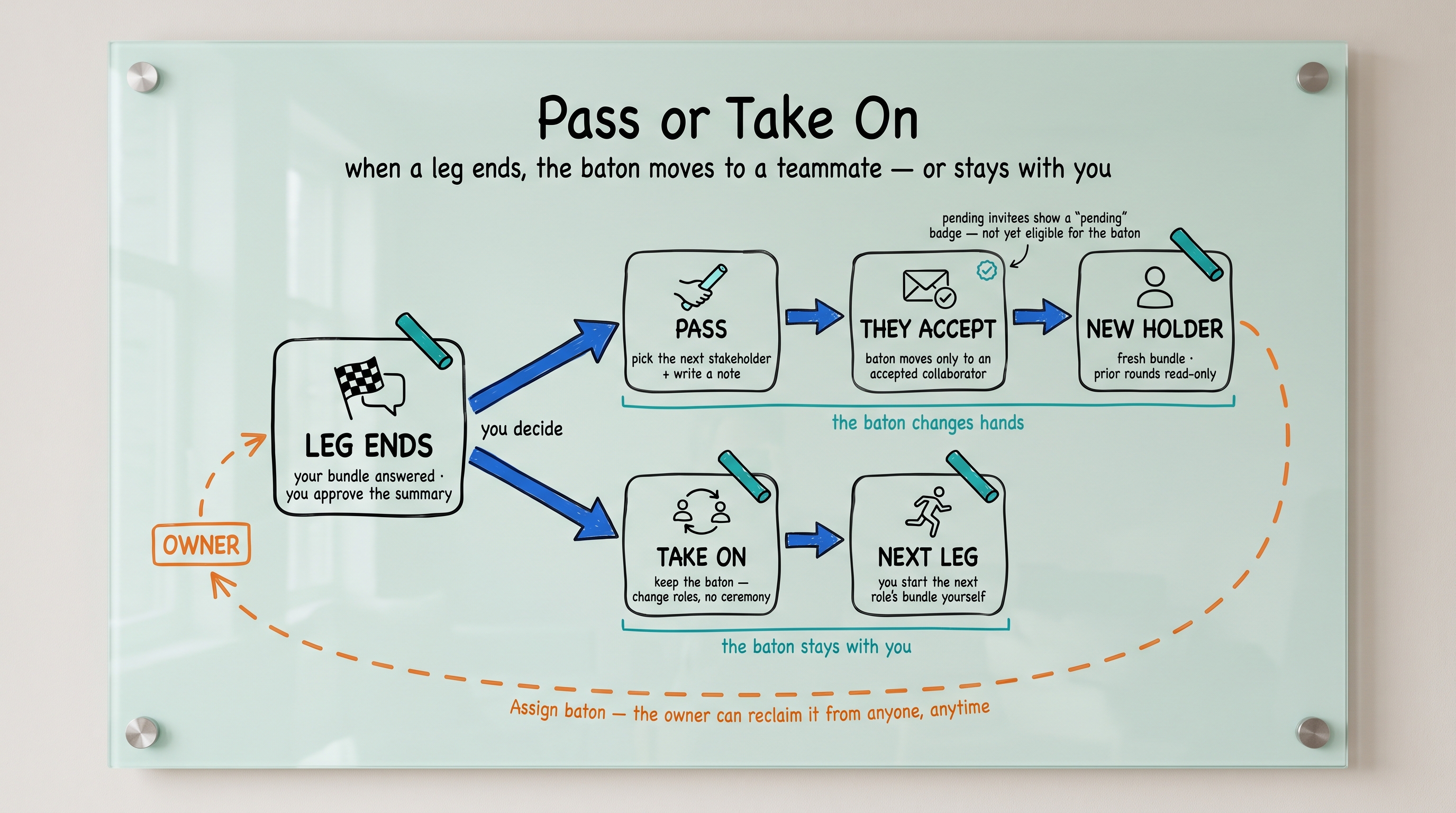
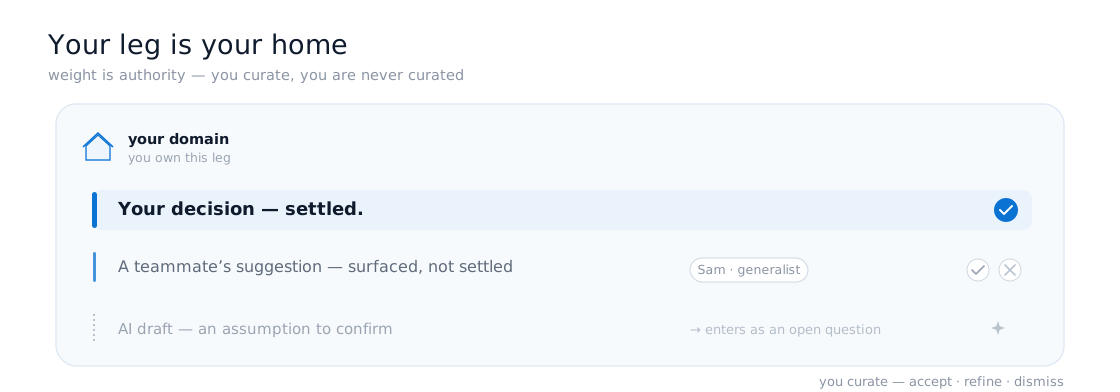
Each ad-hoc collaboration mechanism teams use today has a structured equivalent in xAct.ai. The replacements are not improvements in style: they are improvements in durability, since every signal becomes a record that survives turnover, audit, and re-use.
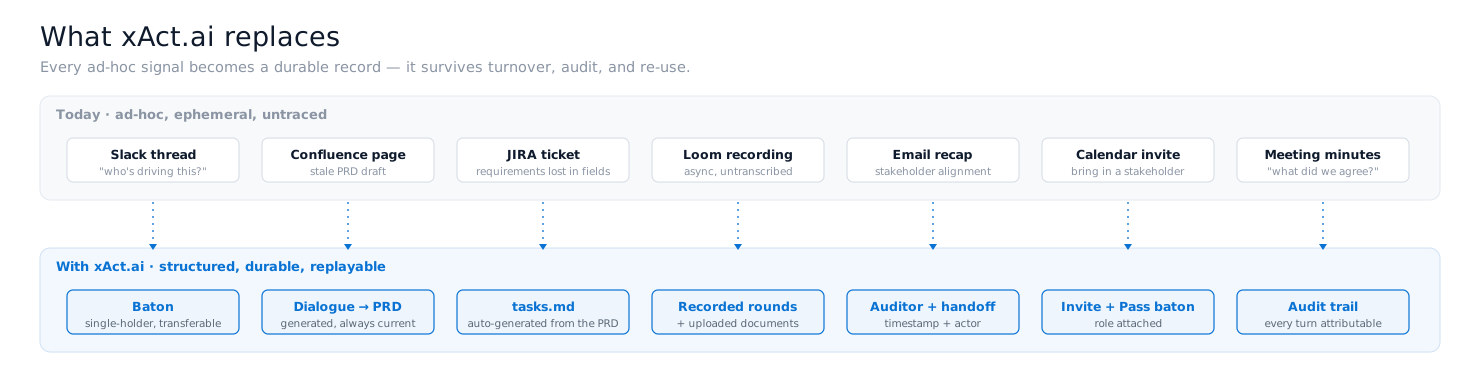
| Today's tool | Used for | xAct.ai equivalent |
|---|---|---|
| Slack thread | "Who's driving this?" | The baton: explicit, single-holder, transferable |
| Confluence page | PRD draft, never updated | Dialogue rounds that compose into a generated PRD |
| JIRA ticket | Decomposed work, requirements lost in fields | tasks.md auto-generated from the PRD |
| Loom recording | Async briefing, untranscribed | Recorded rounds + uploaded documents (txt / md / pdf) |
| Email recap | Stakeholder alignment | Auditor signal + handoff record (timestamp + actor) |
| Calendar invite | Bringing in a new stakeholder | Invite stakeholder + Pass baton |
| Meeting minutes | "What did we agree?" | Audit trail: every round, response, document, and decision is attributable |
xAct.ai walks every project through three phases. Each phase produces a specific artifact that the next phase consumes. The current release is Inception; Construction and Operations are scaffolded for future delivery.
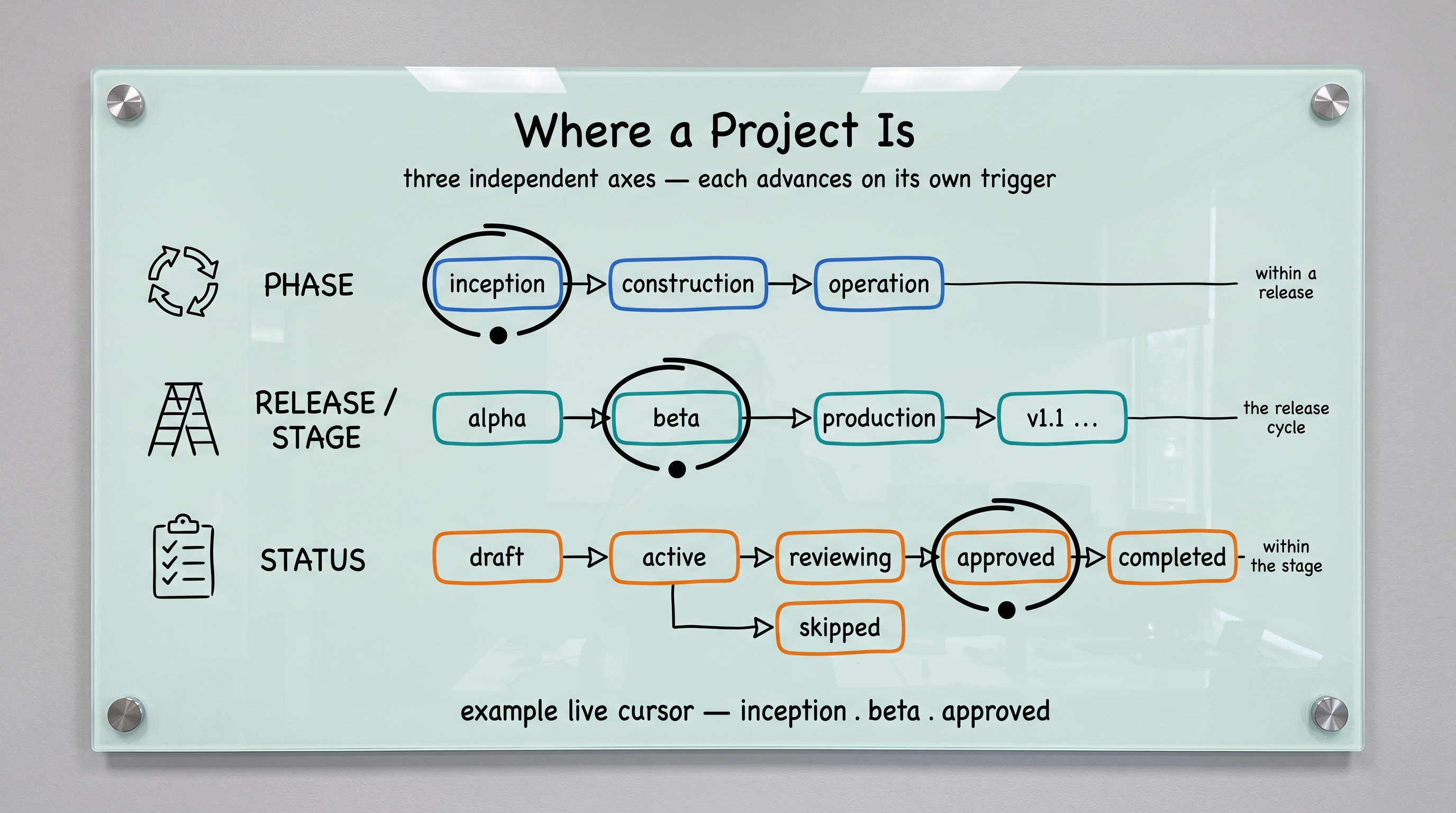
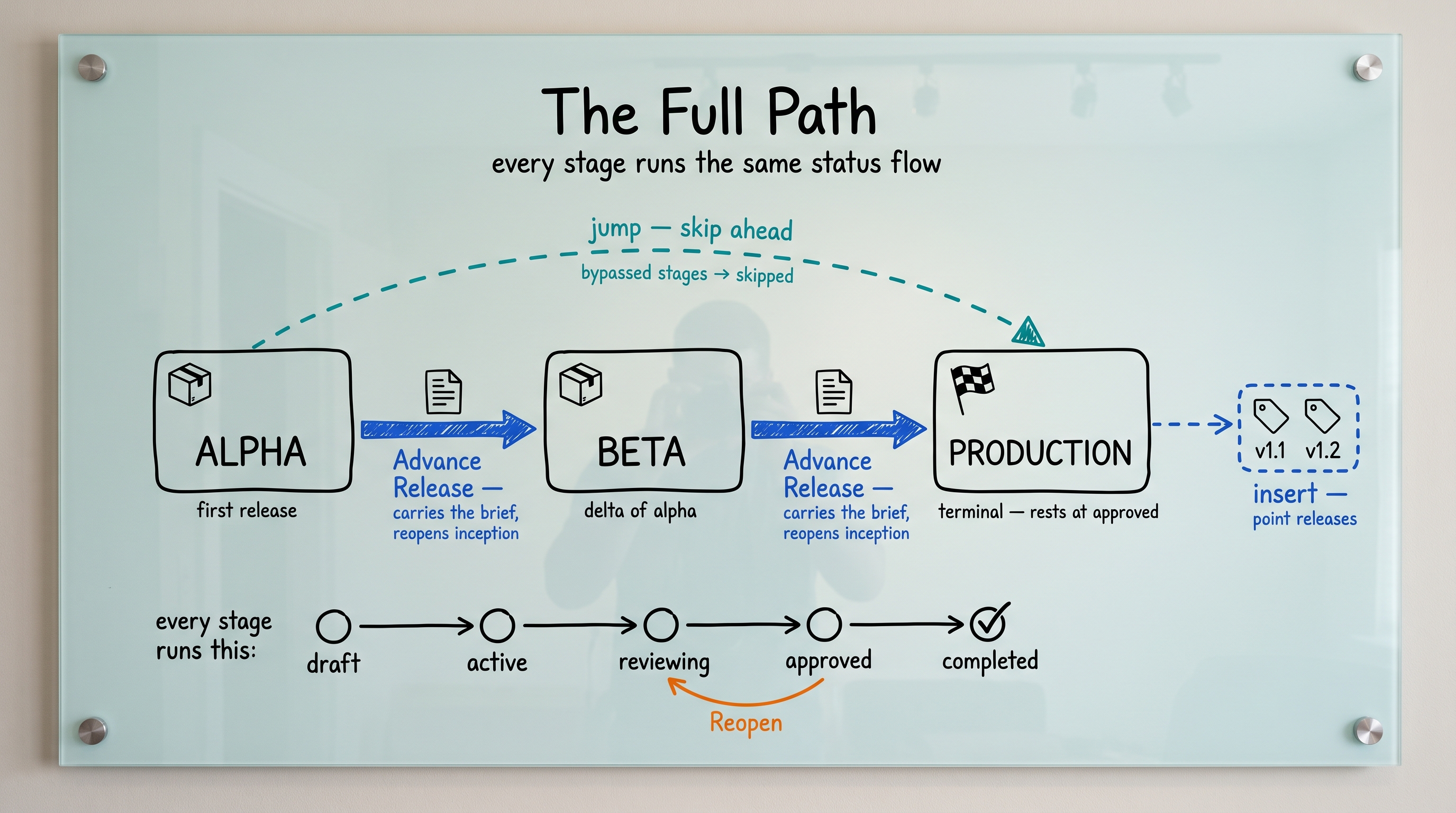
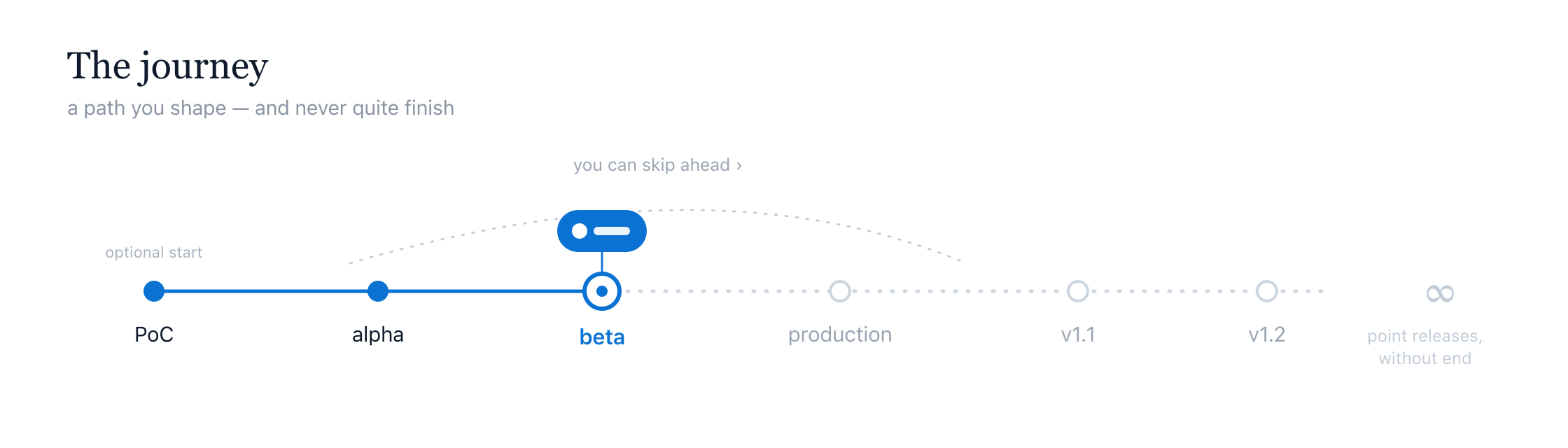
Everything above in one picture: the release phases, the alpha → beta → production path, the seven-role leg that runs inside each stage, and the status pipeline every aspect moves through.
Inception: Live
Construction: Coming next
Operations: Coming next
The Inception phase is a sequence of stakeholders, each owning a slice of the specification, each handing off when their part is done. The lifecycle map above shows the shape of the work; the narrative below shows the choreography of a typical four-stakeholder project moving from PM intent on Day 0 to a generated PRD around Day 10.
A typical project, day by day
Day 0. Dana, the PM, has been asked by the founding team to build a new product for a market the team knows well. They create the project in xAct.ai, give it a name, write a one-paragraph description, and select coverage level L, since this is going to ship to revenue customers, so the team will tolerate longer dialogue in exchange for higher coverage.
Day 1. Dana types a paragraph of context into the "Tell us about your project" panel and clicks Begin Dialogue. xAct.ai extracts a structured brief from that text across every PM section — Customer Segment, Market Landscape, Solution Vision, Product Form, Business Model, Timeframe & Roadmap — and seeds coverage where the SoI already covered ground. Dana can open the brief any time from the Status link next to the Dialogue title. The Customer Segment agent opens with the questions the SoI didn't address: Dana names the target age band, picks the buyer persona (a self-paying individual) on a radio, and types two pain points the segment lives with. Stuck on the opportunity question, Dana clicks Search the Web under the question; in a few seconds the agent proposes an answer grounded in three live links from a trade publication in the sector. Dana edits one phrase and submits. The Coverage Auditor scores the aspect at 0.62, short of the L threshold of 0.9, and asks for one more round. Then Market Landscape opens — the agent searches the public web on Dana's behalf and cites two named competitors and an order-of-magnitude TAM in its opening framing. By end of day, the auditor has advanced through Solution Vision, Product Form, and Business Model.
Day 2. Dana clicks Finish my part. xAct.ai flips the project status to reviewing; any PM sections Dana didn't get to are recorded as skipped rather than silently marked complete, so downstream stakeholders see exactly what was covered. Dana is navigated to the Collaboration tab, clicks Invite stakeholder, enters the email of Kurt Bonimann, the Architect, selects role Architect, and adds a one-line message. Kurt receives an email from noreply@xact.ai with a link to accept and create an account.
Day 3. Kurt accepts, and appears on the Collaborators list. Dana clicks Pass baton on Kurt's row. Kurt now sees the Dialogue tab, types an opening Statement of Intent in the "Open up the dialogue as Architect" panel, and the technical-depth specialist agents take it from there: Architecture Principles, Service Boundaries, Integration Patterns, Data Model, Existing Systems, Deployment Model. Kurt answers across two work sessions. Where those answers reference an existing internal system Dana hadn't mentioned, the agent captures it and the auditor flags it as integration scope to surface in the PRD.
Day 6. Kurt hits Finish my part. Kurt invites Mia, the UI/UX Designer. Mia joins, accepts the baton, and answers the Interaction Model, Information Architecture, Visual Language, and Accessibility agents.
Day 8. Mia hands off to Nadia, the Security reviewer. Nadia's threat-model and compliance review surfaces a SOC 2 Type 2 requirement nobody had mentioned; the auditor records it as a hard constraint that the PRD will incorporate.
Day 10. Dana, who is also the project owner, reviews the completed rounds in every role's tab, then opens the PRD tab and clicks Create PRD. Bedrock composes a structured PRD from the recorded conversation. Dana reads it for completeness — paying attention to the Open Questions & Conflicts section — makes a few inline edits, and clicks Save. Satisfied the document is complete, Dana clicks Approve Collaboration on the project header, which commits the PRD. Then Generate tasks below — the decomposition produces an ordered, dependency-mapped task list any AI coding agent can execute. Finally Dana picks Public on the Create repository card, connects a GitHub account once, and clicks Create repository. xAct.ai pushes PRD.md, tasks.md, README.md, CLAUDE.md, and a .claude/ directory pulled from groundwork to a brand-new repo on Dana's GitHub account. End of Inception.
The same project, run in Slack and Confluence, takes three weeks of calendar time and produces a PRD that the developers re-interpret. Run in xAct.ai, the same conversation is recorded, structured, and consumable by an AI coding agent on Day 11.
xAct.ai gathers a product specification through a structured dialogue: a sequence of focused interviews, one per stakeholder role. Each role covers a fixed, named set of segments — the same for every project — so nothing essential is left to memory. On each round the active role asks a small batch of questions about the current segment; you answer, ask for an example, skip a question, or course-correct. A coverage check decides when a segment holds enough to build on and moves the interview forward.
The Product Manager runs first and is the only role that can approve the finished dialogue and send the project to construction. The Product Manager also decides which specialist roles to invite, and in what order — so a given project may run all seven roles or only a few.
Reading the status panel
The Status link on a project opens a grid of segment cards for each role, with a running count such as “0 of 6 sections done.” If you opened the project with a Statement of Intent (SoI) — a short written brief — each card splits into two lists:
The line under each segment summarizes this as “N extracted · M still open,” or tells you the brief did not touch the section (the AI will start it from scratch) or covered it entirely. Each card also carries a status:
The seven roles, in order
Five roles carry a specialty — a single choice that reshapes their questions without changing their segments. The segment names stay the same; what changes is the conventions, services, and accept-bars the questions assume. The Product Manager and Customer Advocate have no specialty.
Owns the project from end to end. Establishes who the customer is, the market you are entering, the value the product promises, the form the customer meets it in, how it gets paid for, and when it ships. The Product Manager runs first, decides which specialist roles to invite and in what order, and is the only role that can approve the finished dialogue and move the project to construction.
Segments
Speaks FOR the named customer — usually an internal advocate relaying what real customers did, said, and asked for, never someone asked to pretend to be the customer. Describes the customer’s daily reality wherever they meet the product (an app, a device in the field, an API, a service), the friction the product removes, whether the trade is worth it on both sides, and what “working” looks like, in the customer’s own language and never in infrastructure or business terms.
Segments
Sets the shape of the system: the principles that constrain every later choice, the service boundaries, how data moves, the data model, the systems it must live alongside, where it runs, and the staff and recovery tooling a first version needs.
Segments
Specialty — Cloud target
A Architect is assigned one cloud target. It steers Deployment Model and Integration Patterns; the rest of the interview is unchanged. The options:
Designs how the customer experiences the solution on their target platform: the interaction model, how information is organized, the visual language, the accessibility bar, and the polish details that decide whether the customer comes back.
Segments
Specialty — Target surface
A UI/UX Designer is assigned one target surface. It steers every segment — each surface has its own native conventions and accept-bars; the rest of the interview is unchanged. The options:
Makes the build implementable: the concrete tech stack, the repository shape, the local development loop, the testing strategy, the code-quality expectations, and what the build hands off.
Segments
Specialty — Form factor
A Developer is assigned one form factor. It steers Tech Stack, Repository Structure, and Build Artifacts; the rest of the interview is unchanged. The options:
Makes the build defensible: the threat model, who can prove who they are and what they may do, how data is protected, how secrets are handled, which compliance regimes are in scope, and what gets logged.
Segments
Specialty — Compliance regime
A Security is assigned one compliance regime. It steers Data Protection, Compliance Frameworks, and Audit Logging; the rest of the interview is unchanged. The options:
Makes the build operable: the infrastructure baseline, the deploy pipeline, the environments, observability, incident response, release gates, and cost controls. DevOps is the last role in the chain — nothing runs after it.
Segments
Specialty — Cloud target
A DevOps is assigned one cloud target. It steers Infrastructure Baseline, CI/CD Pipeline, and Cost Controls; the rest of the interview is unchanged. The options:
When two people share one role — for example a senior and a junior developer — they answer into the same continuous interview, and a question may carry a “for: <specialty>” hint suggesting who is best placed to answer it. The hint is advisory; anyone holding the role may answer any question.
The reverse is also supported: one person can hold the SAME role twice under two different platform variants — for example a developer building both the web app and the iOS app. Invite them again (or pass the baton to them again) for the same role and pick the other platform when prompted; each variant becomes its own tracked dialogue leg, run and completed independently, so nothing from the first pass is overwritten or lost.
The underlying methodology defines four iterative rounds for building a PRD: Foundation, Technical Depth, Implementation Planning, Task Decomposition. xAct.ai expands those four rounds into 45 aspects spread across seven role bundles, each owned by a specialist AI agent with a tight scope. The expansion serves two purposes: it lets each agent stay focused on its domain, and it lets the right stakeholder lead the right slice of the conversation rather than one PM trying to answer everything.
| PRD round (canonical) | Stakeholder typically leading | xAct.ai aspects |
|---|---|---|
| Round 1: Foundation (product) | Product Manager | Customer Segment · Market Landscape · Solution Vision · Product Form Factor · Business Model · Timeframe & Roadmap |
| Round 1: Foundation (end-user) | Customer Advocate (relays real customers' evidence) | Customer Discovery · Problem Definition · Today's Workarounds · Willingness to Pay · Success Signals |
| Round 2: Technical depth | Cloud Architect | Architecture Principles · Service Boundaries · Integration Patterns · Data Model · Existing Systems · Deployment Model · Admin Tooling · Operations Runbooks |
| Round 3: Implementation planning | UI/UX Designer · Developer · Security · DevOps | Interaction Model · Information Architecture · Visual Language · Accessibility · Tech Stack · Repo Structure · Threat Model · CI/CD · Cost Controls (and others — see role-bundle table below) |
| Round 4: Task decomposition | (Generated automatically from approved PRD) | Output: tasks.md, handed to the Construction phase |
Authentication runs on Amazon Cognito. You can sign in three ways, and they all resolve to the same account, keyed by your email:
- Email & password. Enter your email and password and press Sign in (or just hit Enter). First time? Click Create account to sign up; forgot it? Use Forgot password? to reset by email.
- Continue with Google. One-click federated sign-in with your Google account — no separate password.
- Continue with GitHub. One-click federated sign-in with GitHub. (Connecting GitHub is also what lets a project create a repository later, in Construction.)
Passkeys and two-factor authentication (MFA)
xAct.ai is passkey-first. When a second factor is required for your organization, the enrollment screen offers you a passkey (recommended) or an authenticator app. A passkey is a credential unlocked by Touch ID, Windows Hello, or Face ID — there is no code to type, and your biometric data never leaves your device; once enrolled, the "Sign in with Touch ID / Face ID" button on the sign-in screen signs you in without a password at all. The authenticator-app route still works as the fallback (Google Authenticator, 1Password, Authy): scan the QR code, enter the 6-digit code, and on later sign-ins you will be asked for a fresh code after your password. The two are mutually exclusive — a passkey replaces the authenticator app rather than sitting alongside it. Add or remove passkeys any time under Preferences → Security. Federated sign-in (Google / GitHub) carries its provider's own 2FA.
Preferences & sign out
Open the user menu (top-right) → Preferences to set your notification channel — Email (default), Slack, or Teams — which controls where xAct.ai pings you when a baton is handed to you. Your email is managed by your sign-in and isn't editable here. Sign out is in the same menu.
Access is email-anchored and org-scoped: you only ever see projects you own or were invited to collaborate on.
Connect your own tools (like GitHub) so xAct can read your real data and ask sharper, grounded questions during the dialogue — instead of generic ones. A connector lets the agent look at the actual resource you're building around, so its questions are specific to your work rather than hypothetical.
How to connect
Open Preferences → Integrations, pick a connector, and click Connect. You're sent to the provider's site to authorize access, then returned to xAct. The connector then shows as Connected on the same screen.
How it's used
During a dialogue, when it helps, the agent reads from your connected tool to ground its questions — for example, it can look at your GitHub repository. To nudge it toward the right resource, mention it in your answer (e.g. "my codebase is at github.com/you/repo") and the agent will read from there.
Your privacy
xAct never stores your tokens — they're held in a secure managed vault (AWS AgentCore Identity), not in our database. Connections are read-only: the agent can read your data but never write to it. You can Disconnect anytime from the same screen, which immediately revokes xAct's access.
What you can connect
- GitHub (available now). Read-only access to your repositories, so the agent can ground its questions in your actual codebase.
- Google Workspace (coming next). Read-only access to Google Drive, Gmail, and Calendar.
More connectors are on the way. Each one is opt-in, read-only, and disconnectable at any time.
Enterprise software never starts from scratch: legacy systems, vendors, and in-house code are the ground every new project stands on. The Estate is your organization's confirmed map of that ground — systems, APIs, data stores, repositories, and cloud — surveyed once a quarter or less, and inherited by every project after it. The dialogue opens already knowing what your organization knows, so it asks about what's new instead of asking anyone to recite what already exists.
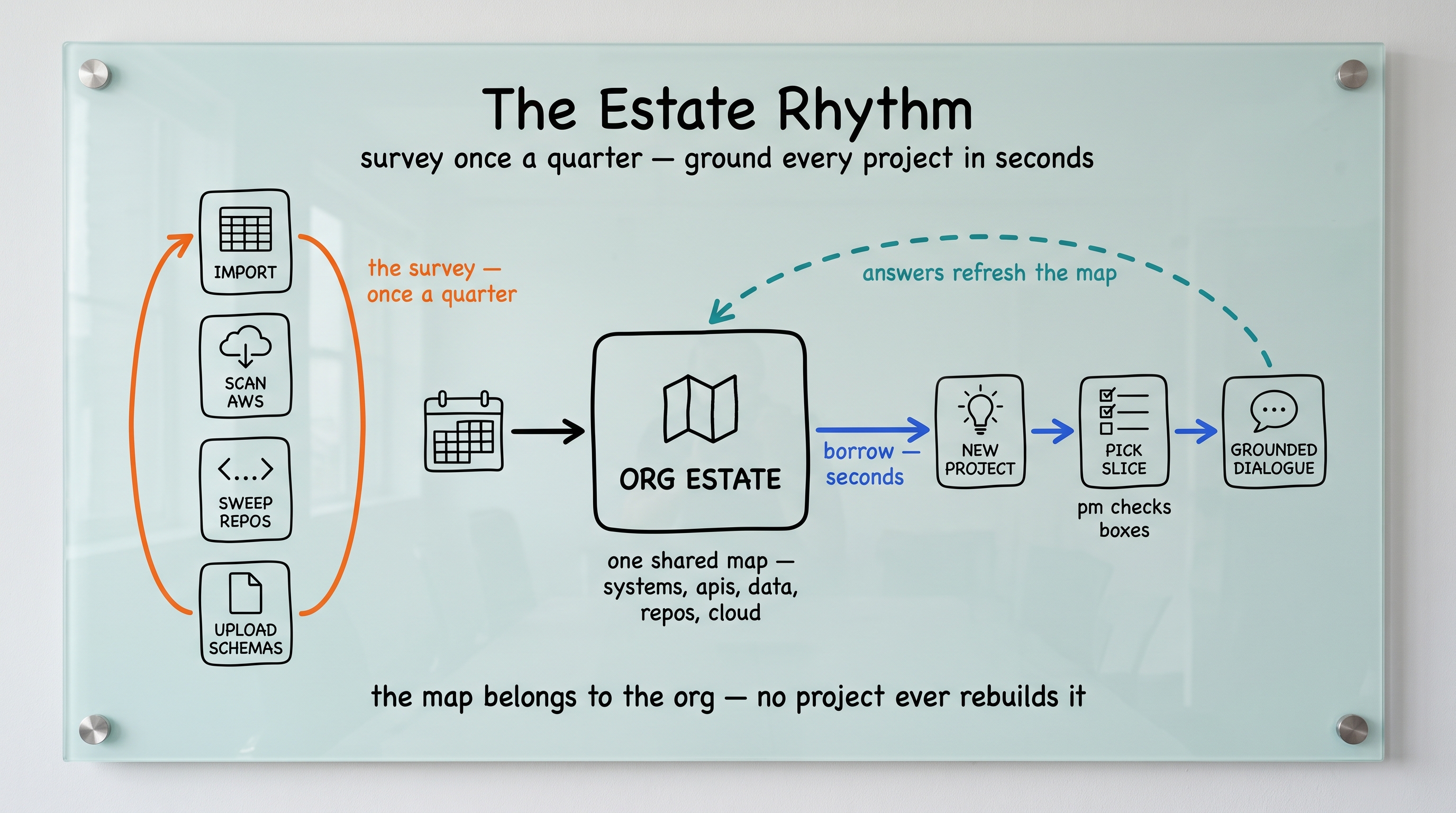
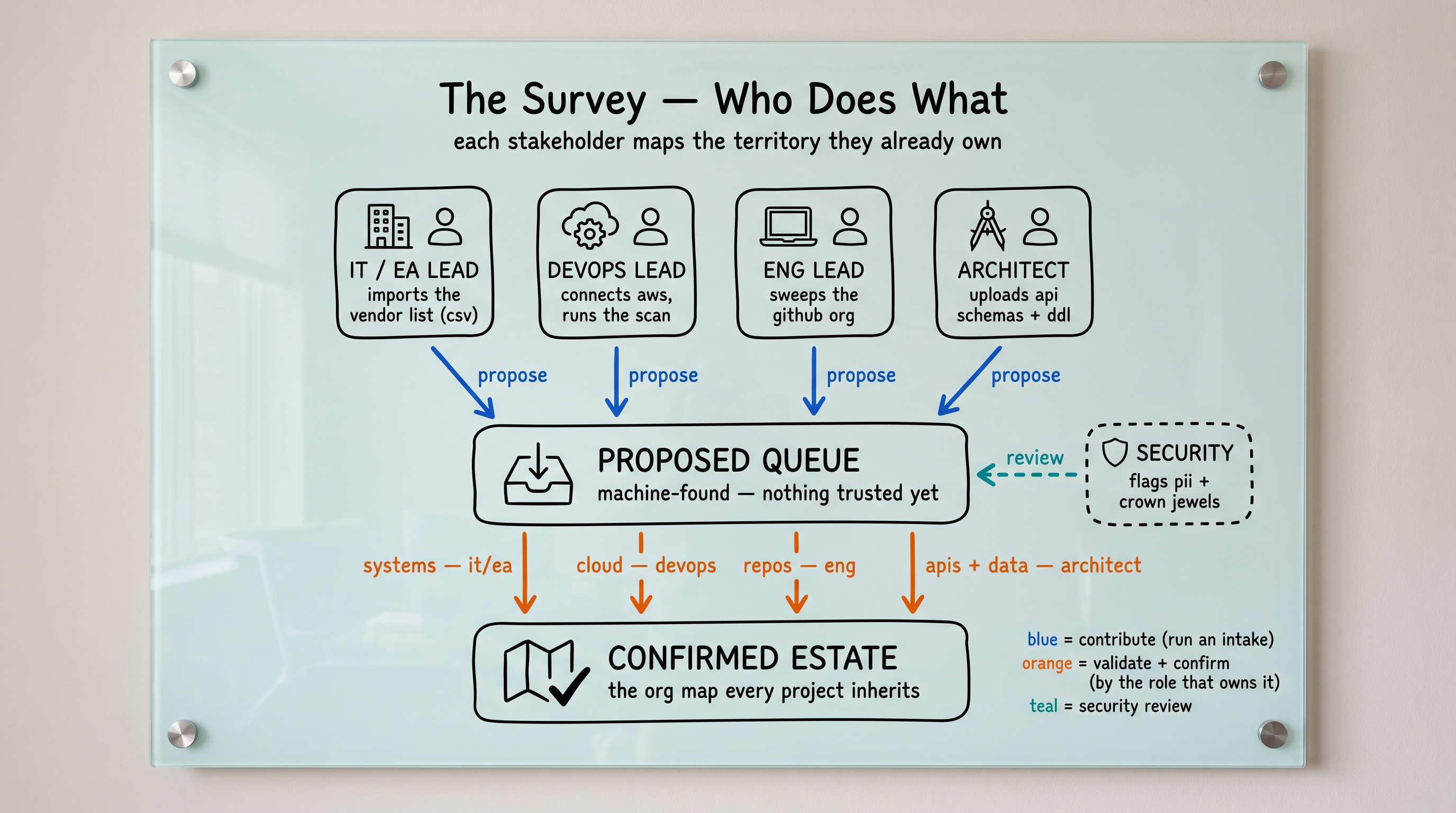
The survey — each stakeholder maps what they already own
Four intakes, each run by the person who already owns that territory in a tool they already use: the IT or enterprise-architecture lead imports the vendor inventory (a LeanIX, ServiceNow, or Okta CSV export), the platform lead runs a read-only AWS scan, the engineering lead sweeps the GitHub organization, and the architect uploads API schemas. Everything the machines find lands in a proposed queue — nothing is trusted until the right hat confirms it, and Security reviews the queue for PII and crown jewels. Fifteen to thirty minutes per person, once a quarter.
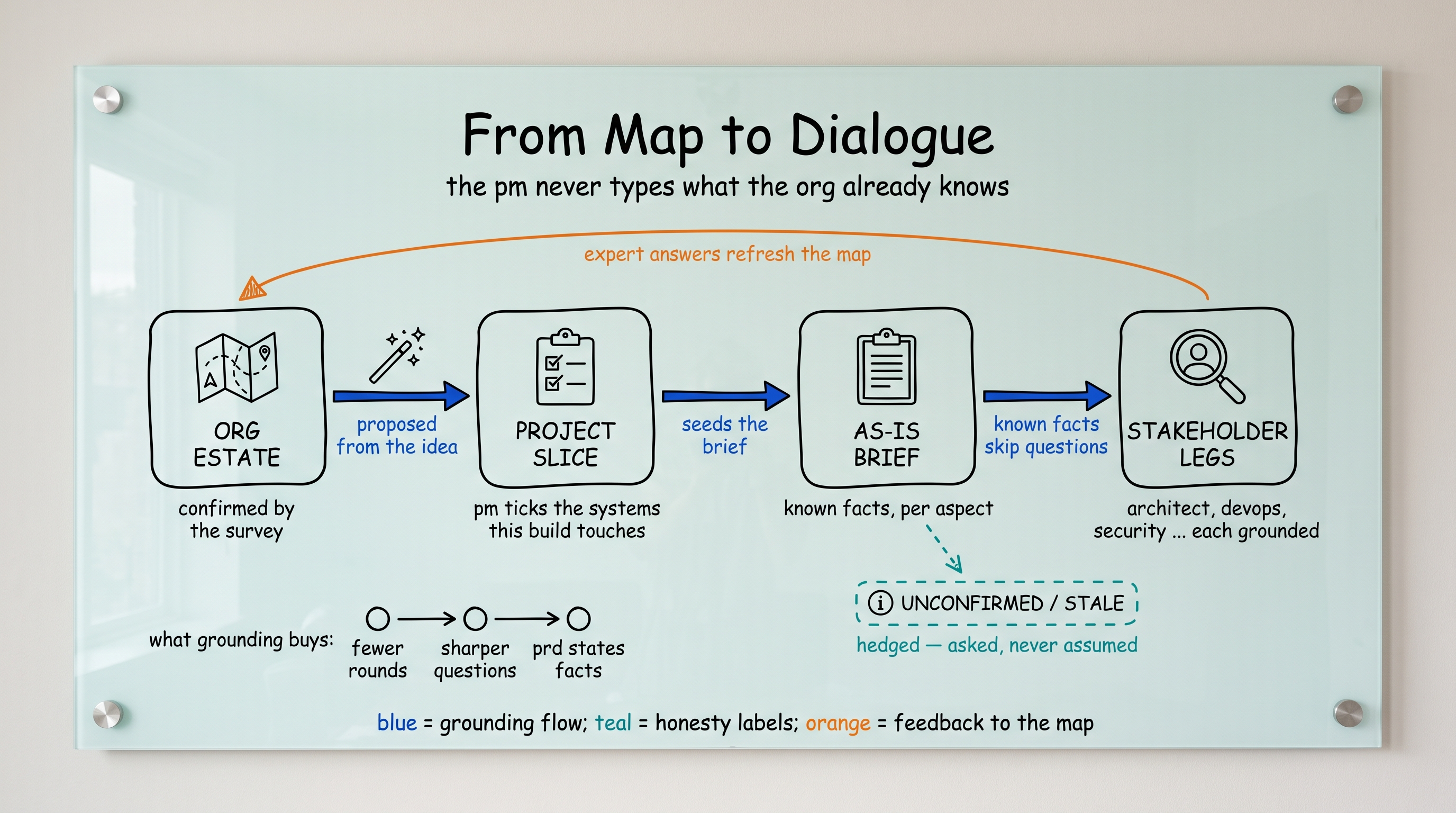
From map to dialogue — the PM's thirty seconds
At project creation the wizard asks one human question — “Which existing systems does this touch?” — pre-answered from your project description. The confirmed slice seeds the brief, every stakeholder's interview opens grounded, and unverified entries are hedged as UNCONFIRMED or STALE rather than assumed. A next release of an existing product can start at its real version (say, 2.4.1) and carry its QA backlog and feature requests as targets.
Why it's worth twenty minutes a quarter
Nobody loves inventory, so every chore ends in a reward: each intake resolves into the Reveal (your estate, counted), one click renders the shareable State of the Estate report with survey credits, and grounded projects visibly skip the questions the map already answers. The map belongs to the organization — no project ever rebuilds it, and entries decay to stale rather than silently expiring.
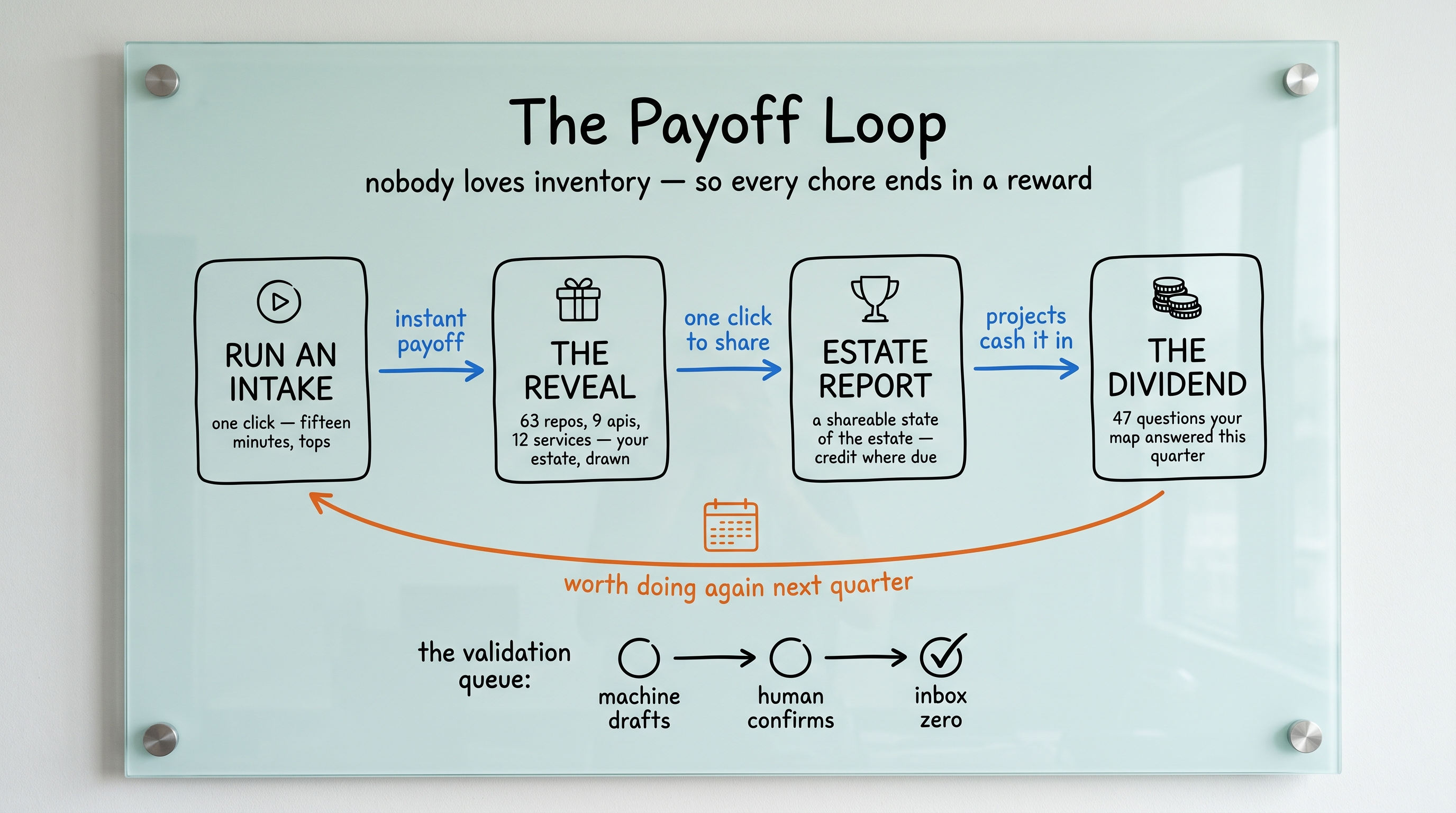
Find it under My Estate in the left navigation. Any teammate can run an intake and propose; validators confirm their own territory; admins govern stewards, staleness, and intake enablement from the admin console.
xAct.ai is available in eleven languages, with two independent settings: the language of the interface, and the language each project's AI dialogue is conducted in.
Interface language
Set the language of the app interface under Preferences → Language. It applies to every project and follows your account. New visitors start in their browser's language automatically, falling back to English.
Dialogue language
When you create a project, the Dialogue language field sets the language the AI conducts that project's interview in — every question, suggestion, summary, and the generated PRD. It is fixed for the life of the project and independent of your interface language, so a teammate reading the app in English still sees a Spanish project's dialogue in Spanish.
Right-to-left
Arabic and Hebrew render the entire interface right-to-left; the layout mirrors automatically.
Supported languages: English, Spanish, French, German, Italian, Portuguese (Brazil), Simplified Chinese, Japanese, Korean, Arabic, and Hebrew.
Translations are machine-generated as a starting point and are being refined.
Open the project, go to the Dialogue tab, and fill in the "Tell us about your project" panel that appears. Type as much context as you have: the customer, the pain, what you're trying to build, anything you already know about pricing or timeline. The more detail you provide up front, the better the dialogue is downstream — your text isn't a throwaway prompt, it's the seed for everything else.
When you click Begin Dialogue, xAct.ai extracts a structured brief from your text across the whole PM section bundle — Customer Segment, Market Landscape, Solution Vision, Product Form Factor, Business Model, Timeframe & Roadmap — identifying what you already covered and what's still open per section. The first AI question batch arrives a few seconds later, focused on the open targets. You can inspect the brief any time by clicking the Status link to the right of the Dialogue title.
Answer using the input control type the agent chose: yes/no, radio, multi-select with select-all, or text. You can attach a document (txt, md, json, csv, yaml, xml, html, log, tsv, pdf, up to 10 MB) at the top of any open round instead of, or in addition to, typing answers. The AI ingests the document text alongside your responses.
As soon as you submit your opening Statement of Intent on a fresh project, xAct.ai extracts a structured brief from your text and maps it across every section the PM is responsible for. Click the small Status link to the right of the Dialogue title to open the snapshot.
The snapshot shows six section cards — Customer Segment, Market Landscape, Solution Vision, Product Form Factor, Business Model, Timeframe & Roadmap — each labelled with status: Completed, In progress, Pending, or Skipped. Each card lists what xAct.ai already knows from your SoI and which targets are still open. The brief seeds the dialogue: the per-section AI agent is told what's on record and asked to focus questions on the open items.
A Skip [section] → next section button in the modal footer lets you advance past the current section manually. Skipping records the section as skipped when you haven't yet answered a round in it (or completed when you have) — downstream stakeholders see exactly what you addressed and what you left for them.
The snapshot is also a debugging tool: if the dialogue feels stuck on a topic, open the snapshot to see whether the AI thinks the topic is already on record (extracted) or still open. The Status link only appears when you hold the baton and a brief has been built.
Every AI question carries four inline helper links under the question text:
- Need this explained? Asks AI to restate the question in plainer words and give one worked example. Information only — does not fill your answer.
- Suggest a Response. Asks AI to propose a plausible answer based on the dialogue so far. The suggestion is auto-filled into the answer field; you can edit it before submitting. Useful when you know the answer but can't get the first sentence out.
- Search the Web. Runs a live Brave Search keyed to the question, then asks AI to propose an answer grounded in 3–5 real results. The answer auto-fills and a Sources list appears below it with clickable links to each citation. Use this for market sizing, competitor naming, regulatory references, or any question where citing public information beats guessing.
- Answered before? Checks whether you (or a collaborator) have already answered the same question in another project, using a semantic search — it matches reworded questions, not just exact text. Each match shows the prior question, the answer, the project it came from, and a match score; Use this answer drops it into the field. When you reuse an answer, xAct.ai offers to Add it to Precedents so it becomes reusable institutional knowledge. Only your own and collaborated projects are searched — never another team's dialogue.
Both suggestions count against the same daily AI throttle as the main dialogue. They never write a turn or advance the project — the answer is yours to accept, edit, or ignore.
The Market Landscape aspect (PM bundle) is itself web-search-enabled: the agent runs 1–3 searches before its opening question batch so its TAM / competitor framing arrives grounded in public sources without you clicking anything.
The Coverage Auditor decides when to advance. After every round the auditor scores the active aspect on a 0–1 scale. When the score reaches the project's coverage threshold (S = 0.7, M = 0.8, L = 0.9, XL = 1.0), the auditor advances. At coverage levels S and M the auditor may also skip an aspect it deems irrelevant — for example, the Security section on an internal-only experiment with no PII.
You can advance manually too. Open the Status link next to the Dialogue title and click Skip [section] → next section in the modal footer. If you've answered at least one round in the section, it's recorded as completed; if you haven't, it's recorded as skipped. The dialogue jumps to the next aspect in your bundle and the Status snapshot updates in place.
Each stakeholder (Product Manager, Customer Advocate, Architect, UI/UX Designer, Developer, Security, DevOps) gets their own aspect bundle. When one role's dialogue is complete, the holder reviews the AI summary, approves it, and passes the baton to the next role. The next holder's dialogue begins with a fresh bundle specific to their responsibility. The sequence continues until every role has contributed and the PRD has coverage from all perspectives.
Finish my part is honest. If you click Finish my part before working through every section in your bundle, the active section is recorded as completed only if you answered at least one round; any sections you didn't touch are recorded as skipped. Downstream stakeholders inherit a status snapshot that distinguishes the two so they know exactly what you covered and what they may need to ask about.
Step 1: Finish the dialogue for your role
- Complete each aspect in your role's bundle by answering the rounds. The Dialogue tab header shows your role, the active aspect, and the round count (e.g. Systems Architect · Service boundaries (round 2 of ≤4)).
- When your bundle's last aspect closes, the coordinator flips the project to reviewing status automatically. The Dialogue tab replaces the round list with a Review & Revise screen.
Step 2: Review and revise the summary
- An AI-generated plain-prose summary appears at the top. Below it, in Contributions by topic (expandable), every response and course correction is grouped under its aspect so you can trace any claim in the summary back to its source.
- If anything is wrong, type a correction in the textarea and click Record correction and refresh summary. The correction is written as a
course_correctionturn, the summary regenerates, and you can iterate until it reads right. There is no cap on the number of corrections. - When satisfied, click Approve summary and prepare handoff. Your approval is stored in
localStorage, so a refresh keeps you in the approved view. Back to review reopens editing if you change your mind.
Step 3: Pass the baton from the approved view
- The approved view shows the final summary in a highlighted card plus a Pass the baton section listing each other collaborator with a Pass baton to [name] button. Clicking one fires the baton transfer. No tab-switching needed.
- If nobody is listed, the approved view shows a warning alert and a Invite a stakeholder button that opens the Collaboration tab. Invite the Systems Architect or Lead Developer by email, and return to this screen once they accept. The baton can only move to an accepted collaborator, not a pending invitee.
- Pending invitations also appear in the approved view as greyed rows with a Pending response badge, so you know who you have invited but not yet heard back from. They are not yet eligible for the baton. Use the Collaboration tab to resend or cancel those.
Step 4: What the next holder sees
- Immediately after the pass, the status bar at the top of the project flips: the new holder sees You hold the baton; everyone else sees [Name] holds it, with the current holder's display name resolved from the collaborators list.
- The new holder lands on the Dialogue tab. If their role is not the PM (the PM has already given their SoI on project genesis), an "Open up the dialogue as [Role]" panel appears first so the new holder can dump their own opening context before the per-section agents take over. Then they walk a fresh aspect bundle matching their role — Architect gets architecture_principles through operations_runbooks, Developer gets tech_stack through build_artifacts, and so on. Their role is auto-applied from the role they were invited as; a confirmation picker only appears if the role is missing or unrecognized.
- Earlier rounds and approved summaries from prior roles remain visible as read-only context, so each new holder inherits the full plan accumulated so far. The process continues role-by-role until the last bundle is approved and the baton returns to the owner for Approve Collaboration and PRD generation.
As the project owner you can reclaim the baton at any time from the Collaboration tab's row-level Assign baton action, regardless of who currently holds it. Use this when an invited stakeholder goes silent for days or when you need to redirect the conversation yourself.
Inception covers seven roles in canonical order. Each role owns an aspect bundle that the coordinator walks through one section at a time. When a bundle is exhausted (or the holder clicks Finish my part), the holder reviews, approves, and passes the baton.
- 1. Product Manager — Customer Segment, Market Landscape, Solution Vision, Product Form Factor, Business Model, Timeframe & Roadmap. The Market Landscape agent web-searches public sources for TAM and competitive framing. The PM is the only required role and the only role that can approve the dialogue and trigger PRD generation. Seeds "who", "why now", and "how it gets paid for".
- 2. Customer Advocate — voice-of-the-customer advocate: usually an internal stakeholder relaying what real customers did, said, and asked for, never someone asked to role-play the customer. Sections: The customer's daily reality, The friction this product removes, What the customer does today without this product, What the customer is willing to change in their day, What "this works" looks like to the customer.
- 3. Architect — Architecture Principles, Service Boundaries, Integration Patterns, Data Model, Existing Systems, Deployment Model, Admin Tooling, Operations & Runbooks.
- 4. UI/UX Designer — Interaction Model, Information Architecture, Visual Language, Accessibility, Error & Empty States, Onboarding Orientation, Feedback & Latency. Platform variant (iPhone, iPad, Android, Mac, Windows, Web, Linux, SaaS) is chosen at role confirmation and steers the per-section guidance.
- 5. Developer — Tech Stack, Repository Structure, Local Dev Experience, Testing Strategy, Code Quality, Build Artifacts.
- 6. Security — Threat Model, AuthN/AuthZ, Data Protection, Secrets Management, Compliance Frameworks (SOC 2 / HIPAA / GDPR / PCI-DSS / FedRAMP), Audit Logging.
- 7. DevOps — Infrastructure Baseline, CI/CD Pipeline, Environments, Observability, Incident Response, Release Gates, Cost Controls.
Only the PM is required. Every other role is optional — the PM decides who to invite. The owner can reclaim the baton at any time. Roles are not strictly sequential — you can invite and pass in any order — but the canonical chain above is what the PRD assumes when generating.
Accepting an invitation adds you to the project's collaborator list but does not give you the baton. The baton is single-holder and transferable only by an explicit action from the current holder or the project owner.
- Open the project from your Dashboard. The status bar at the top shows [Name] holds it, where the name is the current baton holder's display name.
- On the Dialogue tab you can read every round so far as read-only context. A small info alert reads Waiting for [name] to open the dialogue. They hold the baton and will pass it to you when they're ready (or a variant if the dialogue is already in progress).
- On the Collaboration tab, a matching Waiting for the baton alert reiterates that you can't claim the baton yourself and shows who holds it.
- Ping the current holder through whatever channel you normally use. When they pass the baton to you, the status bar flips to You hold the baton on your next render, the Dialogue tab opens up for input, and the most recent unanswered round (if any) becomes editable.
- Create PRD. On the PRD tab, click Create PRD. Bedrock composes a structured PRD from every dialogue turn. You do this before approving — so you review the real document, not a draft.
- Review for completeness. The PRD renders inline. Read it through — in particular the Open Questions & Conflicts section, where the meta-agent surfaces anything a stakeholder left unresolved and any cross-role contradiction. Click Edit to fix anything inline; Save writes back to S3.
- Approve Collaboration. From the project header. Approval commits the PRD as the project's contract and unlocks the remaining steps.
- Generate tasks. Back on the PRD tab, the Tasks card now appears. Bedrock decomposes the PRD into a hierarchical, AI-coding-tool-ready task list.
- Create repository. The Create repository card appears once tasks are ready. Pick public or private, decide whether to seed
.claude/from groundwork, and click Create repository. The repo is created on your own GitHub account via OAuth — no shared service account, no credential paste. The project moves into the Construction phase and the Build tab appears.
repo scope. The token is stored on the owner's xAct.ai user row (KMS-encrypted at rest) and can be revoked any time via Disconnect GitHub.Approving is not a one-way door. If you approve and then realize a stakeholder's input needs another round, the project owner can click Reopen Collaboration in the project header — it shows on any approved project.
Reopening returns the project to reviewing status — exactly where it was the moment before approval. The dialogue, the baton, and every recorded round are untouched: you can record corrections, re-pass the baton to a role, or simply re-approve. A PRD you already generated stays in place; it reflects the pre-reopen dialogue until you regenerate it.
After each role finishes, a cross-role review reads every stakeholder's answers and flags contradictions — for example the PM and the Architect naming different AWS regions. They collect in the Open Questions & Conflicts section on the PRD tab.
Each entry shows both sides in their own words, a soft or hard severity, and usually a recommended resolution, so you can see exactly where they diverge without searching the dialogue. The list is advisory: it is surfaced for your judgment, never auto-applied, and it does not become the dialogue's next questions. You decide.
If the release is already approved, click Reopen Collaboration in the project header to return it to reviewing. If it is still in reviewing, you are already there.
On the Review & Approve screen, settle them one of two ways: record a correction that states the decision — a single correction can clear several conflicts at once — or pass the baton to the disagreeing role for a fresh round. Then re-approve and regenerate the PRD so the decision flows into it.
A resolved conflict stays listed — the section accumulates as a running record rather than clearing — so read it as a decision log. What changes is the PRD body, which now carries the decision you made.
Two places to pass the baton, both driven by the same POST /projects/{id}/baton call:
- Dialogue tab, approved view. After the Inception dialogue completes and you approve the summary, the inline Pass the baton list shows each collaborator with a one-click Pass baton to [name] button. This is the primary path and the one most users use.
- Collaboration tab row actions. The Collaborators table has a Pass baton link in the Actions column of each non-holder row. Use this any time (not just at end-of-dialogue) or as a fallback.
A leg can be shared mid-way. Pass the baton to a teammate in the same role while your leg is still in progress and they continue it exactly where it stands — same section, same progress, same decisions on record. They can finish the leg or hand it back to you the same way, so one leg (the PM's included) can be carried by more than one person.
Reclaiming. As the project owner you can override the current holder and pass the baton to anyone — including yourself — from the Collaboration tab. The button reads Assign baton in that case. Use this when an invited stakeholder goes silent for days or when you need to redirect the conversation.
The baton can only move to an accepted collaborator. Pending invitees (shown with a Pending response badge) are not eligible. Resend the invitation or cancel and re-invite if someone isn't responding.
- Stakeholders and collaborators immediately lose visibility — the project disappears from their Projects list and from their dashboard's "you hold the baton" alerts.
- Dialogue, role assignments, and the entire collaboration ledger are preserved exactly as they were.
- The project moves to your Archived folder on the Projects page — toggle the segmented control at the top of the page (Active / Archived) to switch between folders. Only you, the owner, see the Archived view.
<project-slug>-dialogue.md) containing:- Every AI question and stakeholder response
- Every course-correction note
- Every round summary
- Grouped by release, then by aspect, in chronological order with author and timestamp on each turn
The search box in the top navigation runs a semantic search over every question you've already answered across your projects. Press ⌘K (Ctrl+K on Windows) from anywhere to jump to it, type a question, and matches appear as you type. Because the match is by meaning, a reworded question still finds the prior answer. Click a result to open the source project's dialogue; press Enter for the full results page.
The mode toggle switches how matching works: Smart (semantic, the default and the one to use), Exact (the text appears verbatim), and Fuzzy (the text appears in the question or its answer).
Scope is the same as everything else in xAct.ai: you only ever see answers from projects you own or collaborate on. A search never reaches into another team's dialogue. Within a shared project, any collaborator can find any stakeholder's answers — the same visibility the Dialogue tab already gives them.
When the dialogue has covered enough and you're happy with the draft, the owner approves the release from the PRD tab. Approving finalizes the current release's PRD — and, because a product is never "done," it immediately seeds the next release: the project rolls from alpha → beta (and later beta → production), opening a fresh dialogue whose opening brief is built from everything the prior release established.
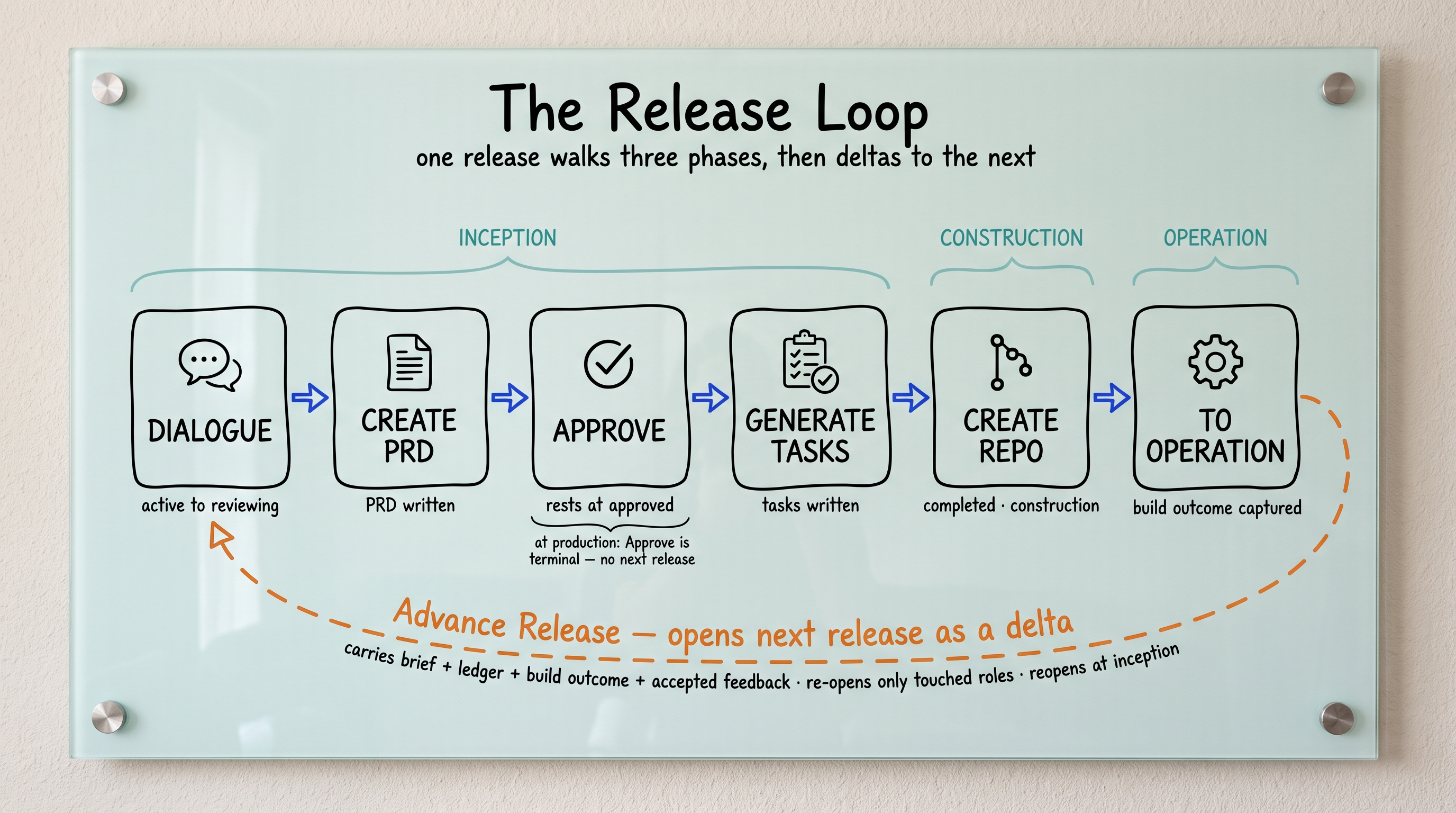
Any product feedback you triaged to Accepted (see the Product Feedback tab) is folded into that opening brief as "feedback to address," so the new version starts by engaging with what your users actually asked for. Approving the final release (production) is terminal — there's no next stage to seed.
Prior releases are never lost: every release keeps its own recorded dialogue and PRD. Approval is owner-only.
Changed your mind, or want to add to something already answered? Use the Respond control on any earlier question or answer in the Dialogue. Your reply isn't a dead-end note — it becomes a real new round on that topic, and the AI engages with it.
Responding also propagates downstream: an impact checker looks at later answers your new input may have affected and re-opens those topics for a fresh pass, so a change early in the dialogue ripples through instead of quietly contradicting later decisions. Watch for the "may warrant revisiting" notes that appear on affected questions.
Toggle Quick mode at the top of the Dialogue when you want depth without the full interrogation. It caps each non-essential aspect at a single round, so the dialogue moves quickly through the lighter topics.
Build-critical aspects (the ones a downstream builder can't complete without) are exempt — they're still fully covered no matter what Quick mode is set to, so a fast pass never drops a section the PRD needs.
A project is multiplayer. When teammates are on the same project you'll see a presence indicator of who's viewing, and the dialogue updates live — a teammate's answer, a new AI round, or a baton handed to you appears without refreshing the page.
A role can have more than one person on it (e.g. two Customer Advocates), but only the current baton holder can answer the AI at any moment — everyone else can read along and add detail when the baton comes to them. That keeps a shared role from talking over itself while still capturing every voice.
xAct.ai is an installable web app and is fully responsive, so it works on a phone or tablet browser and can be added to your device like a native app:
- Desktop (Chrome / Edge): click the install icon in the address bar, or the browser menu → Install xAct.ai. It opens in its own window with a home-screen / dock icon.
- iPhone / iPad (Safari): tap Share → Add to Home Screen.
- Android (Chrome): menu → Add to Home screen / Install app.
Installing gives you an app-like window and icon; xAct.ai still needs a live connection (there's no offline mode — your dialogue always reads and writes through the secure API).
Personal alerts. In the user menu → Preferences, set your notification channel — Email (default), Slack, or Teams — for when a baton is handed to you. Slack and Teams require an Incoming Webhook configured in your workspace.
Per-project channel. On a project's Collaboration tab you can bind a Slack and/or Teams channel (paste an Incoming Webhook URL) so every baton handoff cross-posts there as a shared audit trail for the whole team.
Get the webhook from Slack (workspace admin → Apps → Incoming Webhooks) or Teams (channel → Connectors → Incoming Webhook). If none is configured, notifications simply fall back to email.
You answer similar questions across projects — the ideal customer, the compliance posture, the deployment model. When a question matches one you've answered before, the in-question Answered before? helper surfaces that prior answer for one-click reuse, and offers to save it as a Precedent.
Precedents are your reusable answer library, reachable from Precedents in the left navigation. Saving good answers there means the next project starts from your established positions instead of a blank page — and the top-nav search (⌘K) spans them too.
Some roles come in variants that change which questions you're asked. When you declare or accept a role that has them, pick the one that fits:
- UI/UX: iPhone, iPad, Android, Mac, Windows, Web, Linux, or SaaS.
- Architect / DevOps: AWS, GCP, Azure, on-prem, or hybrid.
- Developer: web, mobile, backend, desktop, full-stack, or embedded/firmware.
- Security: SOC 2, HIPAA, GDPR, PCI-DSS, FedRAMP, or general.
The variant tailors the specialist's guidance (e.g. Apple HIG for an iPhone UI/UX leg, PCI scope for a payments Security leg). Two people can take the same role with different variants — each runs its own leg, and the prior leg's decisions show as labeled context so they build on each other rather than collide. PM and Customer Advocate have no variant.
xAct.ai exposes a read-only REST API under /v1 for pulling project data into your own tools — list projects, read a project, and read its dialogue turns. Requests are authenticated with an API key sent as the x-api-key header and are scoped to your organization.
API keys are minted and revoked by an org admin under Admin → API keys, each with a label and a daily quota; only the hashed secret is stored. The API is read-only today — it never mutates a project.
In your tracker (Canny, Productboard, Aha, Jira, Linear, GitHub Issues, Trello), export the requests as CSV — every one of these supports it. Open your project, go to the Product Feedback tab, pick the Source tracker, choose the CSV file, and click Import.
Columns are matched by name automatically: a title/name/summary column becomes the title; body/description/details becomes the detail; id/key/number (or the URL) becomes the external id used for de-duplication; type, category, and priority map across if present. Rows without a recognizable title are reported as errors rather than silently dropped.
Imports are idempotent: re-uploading the same export skips rows already imported (matched on source + tracker id), so you can safely re-import after each tracker sync. Large files are sent in batches automatically.
On the Product Feedback tab, turn on Enable public feedback page. xAct.ai gives you a public URL (e.g. /f/<id>) you can share with your product's users or link from your app. Anyone with the link can submit a title, type, details, and an optional email — no xAct.ai login required.
Submissions appear in the same Product Feedback list as imported items, tagged with the source hosted-portal, ready to triage. Toggling the page off stops accepting submissions; the URL stays stable if you turn it back on, so a link you've already shared keeps working.
The page has basic spam protection. For a high-traffic public product, treat additional abuse protection (a CAPTCHA / WAF) as a follow-up before promoting the link widely.
In the Product Feedback list, set each item's Status. Mark the ones you intend to build next as Accepted; use Declined for the ones you won't. Triaged is a useful "seen, not yet decided" middle state.
When you approve the current release (from the PRD tab), every Accepted item is automatically written into the next release's opening brief as product feedback to address — so the next version's dialogue opens already engaging with your users' requests. Nothing else carries forward, so triage is how you curate the next release.
Every project builds a product, and that product's users have opinions — feature requests, bug reports, "I wish it did X." The Product Feedback tab on a project is where that feedback lives, so the next release can be shaped by what real users actually asked for instead of guesswork. Feedback accumulates across releases (the product is the project) and is scoped to that one project — you only ever see feedback for projects you own or collaborate on.
Two kinds of feedback — don't confuse them
Product Feedback (this tab) is feedback about your product — the app this project builds. It seeds your next release.
The Feedback button in the top navigation is different: that's feedback about xAct.ai itself — telling us how to improve the tool. It goes to the xAct team, never into your product's dialogue. The two are kept completely separate.
Two ways feedback gets in
- Import from your tracker (CSV). Your users' requests probably already live in a tool — Canny, Productboard, Aha, Jira, Linear, GitHub Issues, Trello. Every one of them exports CSV, so xAct.ai imports them all the same way: export a CSV, choose the source, and upload it. Columns are auto-mapped (title/name, body/description, id, url, type, category, priority). Re-importing the same export is safe — already-imported rows are detected by their tracker id and skipped, so nothing duplicates.
- Collect it directly (hosted portal). For customers who don't run a tracker, xAct.ai hosts a public feedback page per project. Turn it on and share the link with your users; their submissions land straight in the Product Feedback tab. No xAct.ai account is required for them to submit — it's a page built for your end-users.
Triage, then carry it into the next version
Each item moves through a simple lifecycle: New → Triaged → Accepted (or Declined), and finally Shipped. Marking an item Accepted is the decision that it belongs in the next release.
When you approve the current release, every Accepted item is folded into the opening brief of the next release as "Product feedback to address." The dialogue's first questions then engage with it directly — so a feature request a user filed in Canny becomes a real, answered round in your beta's dialogue, and flows through to the PRD. Feedback that's still New, Triaged, or Declined is left out; you stay in control of what carries forward.
Where to find it: open a project and choose the Product Feedback tab. Importing and the portal toggle are owner/collaborator actions; the public portal page itself needs no login.
Every round (an AI question batch + a human response), every document upload, every baton pass, every approval, and every project edit is timestamped and attributed to the actor who performed it. Three consequences a PM should know about:
- Replays survive turnover. If a stakeholder leaves, the next person joins by reading the recorded rounds in order. There is no "let me get you up to speed" meeting to schedule.
- Auditable for compliance and postmortem. When something ships and a compliance auditor or incident reviewer asks "who decided to scope it this way?", the answer is in the round history, not in someone's recollection.
- Onboarding becomes self-service. A new PM joining the company can read the recorded Inception of any past project to understand why the product is shaped the way it is.
Tenets are load-bearing decisions made in advance to prevent repeated team deliberation. Treat them as constraints, not aspirations.
- AI drives, humans decide. The agent proposes architecture, decomposes work, generates code, and runs tests. Humans establish intent, validate output, and accept responsibility. The agent functions as engine; you function as steering mechanism.In xAct.ai: the specialist agents propose questions and structure. You answer, hand off, approve. The agent never moves the project forward without your action.
- Context is the product. A well-structured CLAUDE.md, clear PRD, and disciplined task list produce superior software compared to brilliant developers with vague prompts. Prioritize context development before code investment.In xAct.ai: time spent in the Dialogue tab is direct investment in code quality downstream. A two-hour PRD investment prevents twenty hours of rework.
- Plan the work, then work the plan. No code develops until requirements are documented (PRD), tasks are decomposed, and dependencies are mapped. This provides minimum structure for agents to produce useful work without scope hallucination.In xAct.ai: the Construction phase will not start until the PRD has been generated and approved on this project.
- Agents crash. Build for it. Session persistence, workflow checkpoints, and token budgets separate products from demos. Save state obsessively. Resume gracefully.In xAct.ai: every round, response, document upload, baton pass, and approval is persisted at the moment it happens. Refresh, log out, switch devices: your state survives.
- Permissions are architecture. Every agent-accessible tool requires risk classification: read-only, mutating, or destructive. Destructive actions demand explicit human approval. No exceptions. No shortcuts.In xAct.ai: only the project owner may delete, advance release, generate the PRD, or invite stakeholders. Only the baton holder may answer the AI.
- Clear early, clear often. Context rot and catastrophic forgetting represent the two most common failure modes in AI-driven development. The solution: clear context at 80% capacity, between phases, and before complex problems. Reload from your source of truth.In xAct.ai: each specialist agent works from a tight, scoped prompt. The Coverage Auditor decides when an aspect is well understood and resets focus to the next.
- Small tasks, fast cycles. Every task should complete within a single agent session. Tasks exceeding 30 minutes or affecting more than 5 files require decomposition. This constraint prevents compounding errors.In xAct.ai: the PRD that comes out of Inception is decomposed into atomic tasks for the Construction phase. No 'epics' that span sprints.
- Verify the work and the harness. Two verification levels apply: (1) Did the agent complete this task correctly? (2) Did my changes to the development environment break any guardrails? Both matter equally.In xAct.ai: the Coverage Auditor scores agent output continuously. The owner reviews the synthesized PRD for completeness and approves it before tasks and the repo are generated.
- Eighty percent plumbing. Building with AI agents involves 80% non-glamorous infrastructure: registries, logging, permissions, crash recovery, and 20% model interaction. Teams skipping plumbing build demos; teams investing in it build products.In xAct.ai: invitations, baton mechanics, audit trails, and stakeholder permissions are not the visible work, but they are the work that makes the visible work matter.
- Complexity is debt with interest. Start with a single agent. Add coordination only when evidence supports necessity. The most common failure mode involves overengineering: constructing multi-agent orchestration before sessions survive crashes.In xAct.ai: today's seven specialist agents in the Inception phase are the minimum needed to keep PM-discovery questions out of Architect-discovery scope. We add coordination only when the workflow demands it.
noreply@xact.ai. While the account is in SES sandbox mode, the recipient's email must be individually verified by an administrator before a message will land. If you repeatedly don't receive an invite, ask an admin to verify your address. (The account will move to production sending shortly, removing this constraint.)You cannot claim the baton yourself. It is single-holder and transferable only by an explicit action from the current holder or the project owner.
Check the status bar at the top of the project to see who holds it ([Name] holds it). Ping them to pass the baton. Owners can also override and reassign from the Collaboration tab at any time, so if the holder is unreachable, ask the owner to pull it.
Recorded rounds stay visible to every collaborator regardless of who holds the baton. You can read context, but cannot answer questions or submit corrections until you hold it.
Terms you will meet across the whole journey — from first brief to production. The italic note in parentheses is a quick gloss; the rest is the precise meaning.